The phone in your pocket already records rides for free. Here is the honest case for a dedicated computer anyway, five that earn it, and the one number that will actually change how you ride.
Start with the honest answer: you do not need one. Your phone has GPS, records a route, uploads it, and costs nothing extra. If you have been told a bike computer is a first-year essential, you have been told wrong.
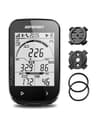
If you want one anyway, buy the iGPSPORT BSC100S. It is real GPS on a 2.6-inch screen you can read without taking a hand off the bar, with a published 40-hour battery life — which means charging it about monthly instead of remembering it before every ride.
The genuine case for a dedicated unit is three things your phone is bad at: battery, glanceability and weather. Screen-on navigation flattens a phone in about two hours, a phone screen is unreadable at an angle in sunlight, and a phone on the bars in the rain is a phone you are worrying about.
How this is funded: we earn a commission if you buy through our links, at no extra cost to you. It never changes which bike we recommend, and we will tell you plainly when we would skip one. Full disclosure.
Quick picks
Ranked on published specs, what the listing does and does not tell you, and who each one actually suits. Select a row to jump to the full write-up. We have not ridden these — here is exactly what we do instead.
#
Bike or gear
Best for
Price
1
iGPSPORT BSC100S GPS Bike Computer
The sensible middle of this category: real GPS, a 2.6-inch screen you can read at a glance without taking a hand off the bar, and a published 40-hour battery life that means you charge it roughly monthly rather than nightly.
The most fully specified budget unit here — 70 grams, IPX6, a 1200mAh battery, all published — which is unusual at thirty dollars and is the reason it is on the page. The 2-inch screen is the compromise you are making.
Speed and distance, on a wired sensor, with a battery that lasts years. It is not a GPS and it does not connect to anything — which is exactly why it still works when your phone is dead.
The only pick here that arrives with a sensor in the box, which matters because cadence — how fast you are pedaling — is the one number that genuinely changes how a beginner rides. Most new riders push a gear far too big far too slowly, and a cadence readout is what makes that visible.
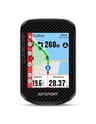
The step up that is actually a different product rather than a better version of the same one: offline maps and off-course warnings mean it navigates, which nothing cheaper on this page does. That is the feature worth paying for, and the only one.
The sensible middle of this category: real GPS, a 2.6-inch screen you can read at a glance without taking a hand off the bar, and a published 40-hour battery life that means you charge it roughly monthly rather than nightly.
Who it is for: Recording rides without thinking about it.
What is good
+Publishes a battery figure — 40 hours rechargeable — which most listings here do not
+2.6-inch display is genuinely glanceable at speed, unlike the 2-inch budget units
+GPS means it records a route, not just a distance number
+Waterproof rating claimed, which a phone on the bars is not
What you give up
−No maps and no navigation — it records where you went, it does not tell you where to go
−Buttons only, which is slower to operate than a touchscreen at a junction
−The listing does not publish the specific IP waterproof rating
−No sensors in the box; cadence and heart rate are extra purchases
Skip this if. Skip this if you want turn-by-turn directions on unfamiliar roads. This unit does not do navigation at any level, and buying it and then wanting maps means buying twice.
Published specifications for the iGPSPORT BSC100S GPS Bike Computer
GPS
Yes
Screen
2.6" LCD
Battery life
40 hours (published)
Navigation
No
Waterproof rating
Not published
Sensors included
Not published
Specifications read from the retailer listing on August 13, 2026. “Not published” means the listing does not state that figure — we do not estimate it.
#2Best budget GPS
CYCPLUS G1 Wireless GPS Bike Computer
The most fully specified budget unit here — 70 grams, IPX6, a 1200mAh battery, all published — which is unusual at thirty dollars and is the reason it is on the page. The 2-inch screen is the compromise you are making.
Who it is for: GPS ride recording at the lowest honest price.
What is good
+Publishes weight (70g), water rating (IPX6) and battery capacity (1200mAh) — three specs most rivals omit entirely
+IPX6 is a defined test under IEC 60529, not a marketing word: powerful water jets from any direction
+GPS at a price close to a wired computer with no GPS at all
+Light enough that the mount does not need to be substantial
What you give up
−2-inch screen shows fewer fields and is harder to read in a hurry
−No navigation and no mapping
−Battery capacity in mAh is not the same as a stated runtime, which the listing does not give
−No sensors included
Skip this if. Skip this if you wear reading glasses or ride with your eyes anywhere but the bars. A 2-inch screen is a real constraint and the extra eight dollars for a 2.6-inch display is the best money in this category.
Published specifications for the CYCPLUS G1 Wireless GPS Bike Computer
GPS
Yes
Screen
2.0"
Weight
70g
Water rating
IPX6
Battery
1200mAh
Navigation
No
Stated runtime
Not published
Specifications read from the retailer listing on August 13, 2026. “Not published” means the listing does not state that figure — we do not estimate it.
#3Best with no charging at all
Cateye Velo 7
Speed and distance, on a wired sensor, with a battery that lasts years. It is not a GPS and it does not connect to anything — which is exactly why it still works when your phone is dead.
Who it is for: Knowing how far you went, without a subscription or a charger.
What is good
+Wired sensor means no pairing, no dropouts and no charging
+Battery life measured in years, not hours
+Cateye has made these for decades; they are genuinely reliable
+Cheaper than any GPS unit by a wide margin
What you give up
−No GPS, no mapping, no route recording, no phone connection
−The wire is one more thing to route along the fork and eventually snag
−You have to enter your wheel size manually for it to be accurate
Skip this if. Skip this if you want to record and share your rides. It cannot upload anything anywhere — if the ride log matters to you, your phone already does this better for free.
Published specifications for the Cateye Velo 7
Type
Wired cycle computer
GPS
No
Connectivity
None
Battery life
Not published
Specifications read from the retailer listing on July 23, 2026. “Not published” means the listing does not state that figure — we do not estimate it.
The only pick here that arrives with a sensor in the box, which matters because cadence — how fast you are pedaling — is the one number that genuinely changes how a beginner rides. Most new riders push a gear far too big far too slowly, and a cadence readout is what makes that visible.
Who it is for: Learning to pedal faster in an easier gear.
What is good
+Cadence and speed sensor included, so the number that actually teaches you something is there from day one
+Bluetooth and ANT+ both supported, so it pairs with heart-rate straps and trainers later
+Syncs to Strava, so the ride log leaves the device
+Auto-backlight on a 2.4-inch screen — it handles dusk without you touching a button
What you give up
−The sensor is another battery to remember and another thing to fall off the crank
−No mapping or navigation
−The listing does not publish a runtime or an IP rating
−Costs more than double the cheapest GPS unit here for one extra data field
Skip this if. Skip this if you already know you spin a high cadence, or if you have no intention of changing how you pedal. Without that specific interest you are paying a premium for a sensor whose number you will glance at twice and never use.
Published specifications for the COOSPO BC107 GPS Computer + BK467 Cadence/Speed Sensor
GPS
Yes
Screen
2.4" with auto-backlight
Sensors included
Cadence and speed (BK467)
Connectivity
Bluetooth and ANT+
Ride sync
Strava
Battery life
Not published
Water rating
Not published
Specifications read from the retailer listing on August 13, 2026. “Not published” means the listing does not state that figure — we do not estimate it.
#5Best for navigation
iGPSPORT BSC300T Touchscreen GPS Bike Computer
The step up that is actually a different product rather than a better version of the same one: offline maps and off-course warnings mean it navigates, which nothing cheaper on this page does. That is the feature worth paying for, and the only one.
Who it is for: Riding routes you have never ridden, without stopping to check a phone.
What is good
+Offline map navigation — it works where there is no phone signal, which is most gravel
+Off-course warning tells you that you have gone wrong within a few hundred meters instead of a few miles
+Touchscreen and buttons both, so it is usable in gloves and precise when parked
+Compatible with an action camera, if that ever becomes a thing you want
What you give up
−Three times the price of the entry GPS units here
−Loading a route onto it is a phone-and-app process you have to learn before the first ride, not at the trailhead
−The listing does not publish a battery runtime or an IP rating
−Touchscreens are slower to trust in heavy rain than buttons
Skip this if. Skip this if you ride the same handful of routes near home. You would be paying triple for navigation on roads you could ride with your eyes shut, and one of the cheaper recorders here does the rest of the job identically.
Published specifications for the iGPSPORT BSC300T Touchscreen GPS Bike Computer
GPS
Yes
Navigation
Offline map, off-course warning
Input
Touchscreen and buttons
Camera control
Insta360 compatible
Battery life
Not published
Water rating
Not published
Specifications read from the retailer listing on August 13, 2026. “Not published” means the listing does not state that figure — we do not estimate it.
What each type actually does
Wired (magnet and sensor)
A magnet on a spoke passes a sensor on the fork; the unit counts revolutions and multiplies by the wheel circumference you typed in. That is the whole mechanism, and it is why these things run for years on a coin cell.
You get speed, distance and time. You do not get a route, a map, an upload, or any record at all beyond a number you read and remember. What you do get is a device that is never flat, costs $25, and works in weather that would worry a touchscreen.
GPS
The unit locates itself from satellites several times a second and works out distance from the track. No magnet, no wheel-size entry, and — the part that matters — it records where you went, which can then be uploaded and looked at afterwards.
GPS distance is slightly less accurate than a correctly-calibrated wheel sensor on a twisty road, and considerably more accurate than an incorrectly-calibrated one, which is what most wired computers become.
GPS with maps
A different product rather than a better version of the same one. The unit stores actual map data offline and draws your route on it, warning you when you leave it. This works with no phone signal, which is the situation on most gravel worth riding.
It is also the only feature on this page worth a genuine price jump — roughly triple the entry GPS units. Everything else the expensive units do, the cheap ones also do.
The one number worth having: cadence
Speed and distance are outcomes. They tell you what happened; they do not tell you what to do differently. Cadence is the one readout that changes behavior, and it is the reason one of the picks here is a bundle with a sensor in the box.
The specific beginner mistake it exposes: pushing too big a gear too slowly. It feels productive — you can feel yourself working — and it loads your knees, tires your legs far faster than your lungs, and makes hills much harder than they need to be. Most new riders sit somewhere around 60rpm without knowing it.
A more sustainable range is roughly 80-90rpm, which feels alarmingly fast and slightly inefficient for the first few weeks and then becomes normal. You cannot work toward that without a number, because your own sense of effort is exactly the thing that is misleading you.
If you take one thing from this page: cadence is the readout worth paying for, and it needs a sensor, which most computers do not include. That is why the COOSPO bundle earns its place despite costing more than double the cheapest GPS unit here.
What IPX6 and IPX7 actually mean
Two of the units here publish an ingress-protection rating and the rest just say “waterproof”. The difference is that IP codes are a defined standard — IEC 60529 — with actual test conditions behind them, and “waterproof” is a word.
The first digit rates protection against solids, 0 to 6, where 6 is dust-tight.
The second digit rates liquids, 0 to 9.
An X means that digit was not tested — so IPX6 says nothing at all about dust, only about water.
IPX6 is powerful water jets from any direction. That comfortably covers riding in heavy rain and hosing the bike down afterwards.
IPX7 is immersion: 30 minutes at up to one meter. More than any bike computer needs, and useful mainly as a sign the manufacturer tested at all.
For cycling, IPX6 is the meaningful thresholdand anything above it is reassurance rather than capability. A unit that publishes no rating is not necessarily bad — it is untested, which is a different thing, and worth knowing rather than guessing about.
Mounting, and why it is worth thinking about
Most computers ship with a rubber-band mount that goes on the stem or the bar tops. It works and it is fine.
An out-front mount— an arm that holds the unit ahead of the bar, where a car’s dashboard would be — is a genuine upgrade for about fifteen dollars, because it puts the screen in your natural sightline instead of requiring you to look down. On a drop-bar bike it also solves a real estate problem: the bar tops are already occupied by cables and your hands.
We would rather say this plainly than sell around it. Skip the computer entirely if:
Your rides are under two hours. Phone battery is a non-issue at that length, and a free app records everything a $40 unit does.
You want to see a map. A phone screen is bigger and better than every computer under about $150. Put it in a mount and you have solved navigation for the price of the mount.
You have not ridden regularly for a season yet. The data is only interesting once there is enough of it to compare against, and there is no rush.
Wired units: enter the wheel circumference, not the wheel size. The manual has a lookup table, and the tire width matters — a 700x25 and a 700x40 are meaningfully different circumferences on the same wheel. This is the single most common source of a computer reading wrong.
Set auto-pause on, and know what it does. It stops the clock at traffic lights, which makes your average speed look better and your elapsed time look shorter. Both are fine as long as you know which number you are looking at.
Pair sensors before the first ride, not at the trailhead. Cadence sensors in particular need a wake-up spin of the crank before the head unit will find them.
Connect the upload once. Whatever service you use, do the account linking at home. Nothing is more annoying than a recorded ride that never leaves the device.
What we would spend
Nothing, in the first season, unless you specifically want cadence. Ride with your phone, and spend the money on shorts or lights.
If you do want one: about $38 on the iGPSPORT BSC100S covers everything most riders want. About $54 on the COOSPO bundle if you are willing to work on how you pedal, which is the only purchase here that will make you a faster rider rather than a better-informed one.
About $25 on the CatEye Velo 7 if what you actually want is a speedometer that never needs charging — a genuinely reasonable thing to want, and something no GPS unit here can offer.
We have not ridden these bikes. Every site in this category says it tested twenty of them. We have not tested any, and we say so. What we did instead: read the manufacturer listings and manuals, compiled the published specs, worked out the real out-the-door cost, and checked live availability and price. Here is exactly how that works.
Questions people actually ask
Do I need a bike computer, or is my phone enough?+
For most first-year riders, your phone is enough. It has GPS, records the route, and uploads it for free. A dedicated computer earns its place on three things a phone is bad at: battery life on rides over about two hours, readability at a glance in sunlight, and surviving rain on the handlebars. If none of those describe your riding, keep the money.
What is the difference between a wired and a GPS bike computer?+
A wired computer counts wheel revolutions with a magnet and multiplies by a circumference you enter, giving speed, distance and time — and nothing else, on a coin cell that lasts years. A GPS unit locates itself from satellites and records where you actually went, which can be uploaded afterwards. Wired is cheaper and never flat; GPS gives you a route rather than a number.
What does IPX6 mean on a bike computer?+
It is a rating under the IEC 60529 standard. The first digit covers solids and the second covers liquids; an X means that digit was not tested, so IPX6 says nothing about dust. IPX6 itself means powerful water jets from any direction, which covers heavy rain and hosing the bike down. IPX7 is immersion for 30 minutes at up to one meter — more than a bike computer needs.
Is a cadence sensor worth it for a beginner?+
It is the one readout that changes how you ride rather than just describing what happened. Most new riders push too big a gear at around 60rpm, which loads the knees and makes hills harder than necessary, and you cannot correct that without seeing the number. If you are willing to work on pedaling faster in an easier gear, it is the most useful thing on this page.
Do cheap bike computers have maps?+
No. Mapping and turn-by-turn navigation is the one feature that genuinely costs more, and it is roughly triple the price of an entry GPS unit. Everything else the expensive units do, the cheap ones also do. If you need navigation, buy it deliberately — buying a recorder and then wanting maps means buying twice.
Why does my bike computer show the wrong distance?+
On a wired computer, almost always the wheel circumference setting. The manual has a lookup table and the tire width matters — a 700x25 and a 700x40 are meaningfully different circumferences on the same wheel, and entering the wheel size instead of the circumference is the most common setup error. On a GPS unit, expect small differences on twisty roads; that is normal.
Sources
Specifications come from the manufacturer or the retailer listing, dated. Where a figure is not published, we say so rather than estimating it.
IEC — Ingress Protection (IP) ratings — The IEC 60529 standard behind IPX6 and IPX7: the first digit rates solids, the second liquids, and IPX7 is defined as 30 minutes' immersion at up to 1 meter (accessed August 13, 2026)