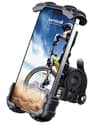
Buy the Lamicall if you want one mount that works, at about fifteen dollars, with a lock rather than friction alone holding the phone. It is the sensible default and it is what most people should stop reading and buy.
Buy the Quad Lock out-front if your phone is expensive enough that watching it bounce into a ditch would genuinely ruin your week. It is the only mount here that holds the phone by a mechanical twist-lock rather than by squeezing its edges — and the only one that needs you to buy a case as well, which is a real cost the listing price hides.
The question worth asking before any of this: do you actually need the phone visible? On routes you know, a phone in a jersey pocket is drier, safer, better protected and no less useful. A mount earns its place when you need to read the screen while moving — which mostly means navigation.
How this is funded: we earn a commission if you buy through our links, at no extra cost to you. It never changes which bike we recommend, and we will tell you plainly when we would skip one. Full disclosure.
Quick picks
Ranked on published specs, what the listing does and does not tell you, and who each one actually suits. Select a row to jump to the full write-up. We have not ridden these — here is exactly what we do instead.
#
Bike or gear
Best for
Price
1
Lamicall Bike Phone Holder
Your phone is already a better bike computer than most bike computers, and this is the cheapest way to put it where you can read it. One-handed operation is the detail that separates a usable mount from a fiddly one.
The only mount here that does not hold your phone by squeezing its edges. A twist-lock interface on a dedicated case is a mechanical connection rather than a friction one, and out-front placement puts the screen where a bike computer would sit instead of hiding it behind the bars.
A small aluminum mount that fits on the headset top cap rather than the bar, which is the placement that matters on a drop-bar bike — the bar tops are already crowded with cables and your hands, and the area ahead of the stem is the one flat piece of real estate left.
A fully enclosed bag rather than an open clamp, which changes what the mount is for: this is the one you fit when you already know you will be riding in rain, and the touchscreen front means you can still use the screen through it.
Ten dollars to find out whether you actually want a phone on the handlebar. That is a real question — plenty of people fit a mount, discover they prefer the phone in a pocket, and never use it again — and this is the cheapest honest way to answer it.
Your phone is already a better bike computer than most bike computers, and this is the cheapest way to put it where you can read it. One-handed operation is the detail that separates a usable mount from a fiddly one.
Who it is for: Navigation, without buying a GPS unit.
What is good
+One-hand operation, so the phone goes in and out at a stop without two hands
+Locking mechanism rather than friction alone, which is what keeps it on over potholes
+Fits a wide range of handlebar diameters, drop bars included
+Turns the phone you own into the ride computer you were going to buy
What you give up
−Vibration through a rigid mount can damage some phone camera stabilizers over time
−A phone on the bars is exposed to rain and to being dropped
−Screen-on navigation eats battery fast on a long ride
Skip this if. Skip this if you ride routes you already know. A phone in a jersey pocket is safer, drier and better protected, and a mount only earns its place when you actually need to read the screen while moving.
Published specifications for the Lamicall Bike Phone Holder
Mount type
Handlebar clamp, lockable
One-hand operation
Yes
Bar compatibility
Round bars, multiple diameters
Waterproof
Not published
Max phone size
Not published
Specifications read from the retailer listing on August 11, 2026. “Not published” means the listing does not state that figure — we do not estimate it.
#2Best for an expensive phone
Quad Lock Out Front Handlebar Mount (V3)
The only mount here that does not hold your phone by squeezing its edges. A twist-lock interface on a dedicated case is a mechanical connection rather than a friction one, and out-front placement puts the screen where a bike computer would sit instead of hiding it behind the bars.
Who it is for: A phone you would be genuinely upset to watch bounce into a ditch.
What is good
+Positive twist-lock rather than spring-loaded clamp arms — it does not let go over a pothole
+Out-front position puts the screen in your natural sightline, not down between the bars
+Universal adapter available if your phone has no Quad Lock case
+The system is standard enough that car and desk mounts use the same interface
What you give up
−Needs a Quad Lock case or the universal adapter — the mount alone will not hold a bare phone, and the case is a separate purchase
−Most expensive mount here before you have bought the case
−Out-front arms put the phone where a front-wheel spray hits it
−No published weight or water rating; a phone here is unprotected in rain unless you add their poncho
Skip this if. Skip this if you change phones often or share the bike. The whole system is built around a case for one specific handset, and every new phone means buying into it again — a universal clamp mount does not care what you own.
Published specifications for the Quad Lock Out Front Handlebar Mount (V3)
Attachment
Twist-lock (case or universal adapter)
Position
Out front of the handlebar
Phone case required
Yes — Quad Lock case or universal adapter
Weatherproofing
Not published
Weight
Not published
Specifications read from the retailer listing on August 13, 2026. “Not published” means the listing does not state that figure — we do not estimate it.
#3Best for drop bars
RBRL Aluminum Stem Phone Mount
A small aluminum mount that fits on the headset top cap rather than the bar, which is the placement that matters on a drop-bar bike — the bar tops are already crowded with cables and your hands, and the area ahead of the stem is the one flat piece of real estate left.
Who it is for: Drop bars, where there is no clear space on the bar itself.
What is good
+Top-cap mounting keeps the bar tops free for your hands, which a bar clamp does not
+CNC-machined and forged aluminum rather than molded plastic, so the clamp does not creep or fatigue
+One-second quick-lock V-shape clamp for attaching and detaching at every stop
+Fits 4.7 to 7.2-inch phones, and the listing describes it as camera-friendly rather than covering the lenses
What you give up
−Stem position sits the phone low and flat — worse to read at a glance than an out-front arm
−A rigid metal mount transmits every road buzz straight into the phone, anti-shake design or not
−Mounting on the headset cap means undoing the top cap bolt, which is not a no-tools install
−Not weatherproof in any respect
Skip this if. Skip this if you will be reading turn-by-turn directions constantly. Low and flat on the stem means dropping your eyes further and for longer than an out-front mount, and on a road you do not know that is the wrong trade.
Published specifications for the RBRL Aluminum Stem Phone Mount
Attachment
Headset top-cap mount, CNC aluminum
Position
Ahead of the stem, between the bars
Quick release
Yes — one-second V-shape clamp
Phone size range
4.7-7.2"
Weatherproofing
Not published
Weight
Not published
Specifications read from the retailer listing on September 29, 2026. “Not published” means the listing does not state that figure — we do not estimate it.
#4Best for wet weather
HUANLANG Waterproof Enclosed Bike Phone Bag
A fully enclosed bag rather than an open clamp, which changes what the mount is for: this is the one you fit when you already know you will be riding in rain, and the touchscreen front means you can still use the screen through it.
Who it is for: Navigating in weather that would worry you about an open mount.
What is good
+Fully enclosed, so rain and road grit never reach the phone
+Touchscreen front panel — you can operate the screen without opening the bag
+360-degree adjustable, so portrait for maps and landscape for anything else
+Fits 4.7 to 7-inch phones, which covers essentially every current handset
What you give up
−An enclosed bag traps heat, and a phone navigating in summer sun inside plastic will throttle or shut down
−The clear panel scratches and eventually clouds the screen underneath
−Touch response through a membrane is noticeably worse than a bare screen
−The listing claims waterproofing but does not publish an IP rating to back it
Skip this if. Skip this if you mostly ride in the dry. You are accepting heat build-up, a scratchy window and worse touch response to solve a problem you do not have — an open clamp is better at everything except rain.
Published specifications for the HUANLANG Waterproof Enclosed Bike Phone Bag
Attachment
Enclosed bag, handlebar mount
Phone size range
4.7-7.0"
Rotation
360 degrees, adjustable
Screen access
Touchscreen front panel
Sun visor
Yes
IP rating
Not published
Weight
Not published
Specifications read from the retailer listing on September 29, 2026. “Not published” means the listing does not state that figure — we do not estimate it.
#5Best for finding out if you want one
LISEN Handlebar Phone Holder
Ten dollars to find out whether you actually want a phone on the handlebar. That is a real question — plenty of people fit a mount, discover they prefer the phone in a pocket, and never use it again — and this is the cheapest honest way to answer it.
Who it is for: Testing whether you want a phone on the bars at all.
What is good
+Cheapest mount on the page by some distance
+Tool-free installation, so it is on the bike in a couple of minutes
+Fits a range of bar diameters including the ones on a flat-bar bike
+Low enough cost that losing it to a pothole is annoying rather than expensive
What you give up
−Spring-clamp arms hold by friction alone, which is the mechanism that fails on rough ground
−No weatherproofing at all
−The listing does not publish a maximum phone size or a weight
−Plastic clamp on the bar can creep under vibration and needs re-tightening
Skip this if. Skip this if you ride anywhere genuinely rough, or if your phone is expensive. A friction clamp is exactly the wrong mechanism for washboard gravel, and the saving over a locking mount is smaller than any screen repair.
Published specifications for the LISEN Handlebar Phone Holder
Attachment
Spring-clamp arms, handlebar
Installation
Tool-free
Locking mechanism
No — friction clamp
Max phone size
Not published
Weatherproofing
Not published
Weight
Not published
Specifications read from the retailer listing on August 13, 2026. “Not published” means the listing does not state that figure — we do not estimate it.
The two mechanisms, and why it matters
Spring-clamp arms
Four arms squeeze the edges of the phone. Universal — it fits whatever you own now and whatever you own next — cheap, and held together by friction and spring tension.
Friction is a fine mechanism on smooth tarmac and a poor one on washboard gravel. The failure mode is not dramatic: the phone works its way out over several miles of vibration and then leaves when you hit something. It is also worth knowing that clamp arms grip the phone’s side buttons, so a mount that fits tightly may be holding down your volume rocker for the whole ride.
Locking interfaces
A twist-lock or a positive latch, which is a mechanical connection rather than a grip. It does not let go under vibration because there is nothing to work loose — releasing it takes a deliberate motion.
The catch is that the interface has to be attached to your phone somehow, which means a specific case or a stick-on adapter. That is a genuine lock-in: change phones and you buy into the system again. It is the right trade for an expensive phone on rough ground and the wrong one if you change handsets often or share the bike.
Where it goes on a drop-bar bike
This is where drop-bar bikes differ from the flat-bar bikes most phone mounts are designed for, and it is worth a paragraph.
Bar tops. The obvious spot and usually the wrong one. It is a hand position you actually use, and a mount there takes it away. The cables under the tape also make the bar thicker and less round than the clamp expects.
The stem. The one genuinely spare piece of real estate on a drop-bar bike — flat, rigid, and nothing else wants it. The downside is that the phone sits low and flat, so you drop your eyes further to read it.
Out front. An arm holding the phone ahead of the bar, where a car dashboard would be. Best position by a distance for reading while moving, because the screen is in your natural sightline and angled toward you. It is also the most exposed position in a crash and directly in the front wheel’s spray.
For navigation, out front is worth the money. For anything else, the stem is the sensible drop-bar answer.
The vibration problem nobody mentions on the box
Modern phone cameras use optical image stabilization — tiny magnetically suspended lens elements that move to cancel out shake. They are engineered for hand shake, which is low-frequency and small.
A phone bolted rigidly to a bicycle on rough ground gets high-frequency, high-amplitude vibration instead, and multiple manufacturers now publish warnings that sustained exposure to it can damage those systems permanently. The symptom is blurry photos afterwards, and it does not come back.
You do not need to panic about this — an hour on smooth tarmac is not a problem. Two sensible precautions if you ride rough surfaces regularly:
Choose a mount with some compliance — a silicone or rubber interface rather than aluminum bolted straight to an aluminum stem. A rigid metal mount transmits everything.
Put the phone in a pocket for the genuinely rough sections if you are not navigating right then. It costs nothing.
Rain, heat and the enclosed-case trade
An enclosed mount — a clear pouch with a touch-sensitive front — solves rain properly. Nothing reaches the phone, and you can still operate the screen through the membrane.
It introduces two problems in exchange, and both are worth knowing before you buy:
Heat. A phone running GPS navigation with the screen on generates real heat, and inside a sealed plastic pouch in summer sun it has nowhere to put it. Phones respond by throttling and then by shutting down, and a phone that shuts down mid-navigation is worse than no mount.
The window. Clear plastic scratches. After a season the screen underneath is being read through something translucent, and touch response through a membrane is noticeably worse than a bare screen even when new.
The verdict on this page reflects it: the enclosed mount is the right answer if you already know you will ride in weather, and the wrong one if you mostly ride dry. An open clamp is better at everything except rain.
Battery, which is the real limit
Screen-on GPS navigation flattens a modern phone in roughly two hours. That is the number that ends most people’s enthusiasm for phone-as-bike-computer, and it is why a dedicated computer exists at all.
Three things that genuinely extend it:
Download the map offline before you leave. Constantly fetching map tiles over a weak rural signal is a bigger battery drain than the screen, because the radio hunts at full power when the signal is poor.
Turn the screen off between junctions. Most navigation apps will speak the next turn through a headphone or the speaker with the screen dark. This roughly triples what you get.
Carry a small power bank rather than buying a bigger phone. A cable from a jersey pocket to the bars is untidy and it works.
Fitting it so it stays put
Put a strip of old inner tube under the clamp. It stops the clamp creeping on the bar, and it stops the clamp marking the paint. This is the single most useful thing on this list.
Tighten to snug, then stop. A plastic clamp over-tightened cracks, usually a week later and usually while you are riding. If you are mounting to a carbon bar, this stops being advice and becomes a rule.
Test it with the bike stationary. Grab the phone and try to pull it out sideways and upward. If it moves at all in your hands, a pothole will take it.
Re-check after the first ride. Everything settles. This is also true of the mount you have had for a year, which is why phones fall off mounts that used to be fine.
When to leave it in your pocket
We would rather say this than sell you a mount you will use twice:
You ride routes you know. There is nothing to read. A phone on the bars is just an exposed phone.
You ride in traffic. A screen in your sightline is a screen you look at, and the place you need to be looking is the road.
Your bike gets left in public. A visible phone mount tells anyone walking past what to look for, even when the phone is gone. Our storage and security guide covers what that changes.
What we would spend
About $15 on the Lamicall, which is enough mount for almost everybody. About $10 on the LISEN if you genuinely do not know yet whether you want a phone on the bars, because that is a real question and this is the cheapest way to answer it.
About $40 on the Quad Lock out-front — plus the case, which is a separate purchase — if you ride rough ground with a phone you would be upset to lose. That is the honest total, and it is roughly the price of a budget GPS computer that would not risk the phone at all.
We have not ridden these bikes. Every site in this category says it tested twenty of them. We have not tested any, and we say so. What we did instead: read the manufacturer listings and manuals, compiled the published specs, worked out the real out-the-door cost, and checked live availability and price. Here is exactly how that works.
Questions people actually ask
Are bike phone mounts safe for the phone?+
Mechanically, a locking mount is safe and a friction clamp is a risk on rough ground. The less obvious issue is vibration: modern phone cameras use optical image stabilization with magnetically suspended lens elements, and manufacturers now warn that sustained high-frequency vibration from a rigid bike mount can damage them permanently. Choose a mount with a rubber or silicone interface, and pocket the phone on genuinely rough sections.
Where should I mount a phone on a drop-bar bike?+
The stem, in most cases. Bar tops are a hand position you actually use and the cables under the tape make them a poor clamping surface. An out-front mount is the best position for reading while moving because the screen sits in your natural sightline, but it is the most exposed spot in a crash and sits in the front wheel's spray.
Do I need a special case for a bike phone mount?+
Only for locking systems like Quad Lock, where the twist-lock interface is built into a case or a stick-on adapter. That is a real extra cost the mount's listing price does not show, and it locks you into the system when you change phones. Spring-clamp mounts need no case at all and fit whatever you own.
How long does phone navigation last on a bike ride?+
About two hours with the screen on, which is the practical limit that pushes people toward a dedicated computer. You can extend it a long way: download the map offline before leaving so the radio is not hunting for tiles on a weak rural signal, let the app speak turns with the screen dark, and carry a small power bank.
Are waterproof enclosed phone mounts worth it?+
If you already know you will ride in weather, yes. If you mostly ride dry, no — an open clamp is better at everything except rain. Enclosed cases trap heat, and a phone running GPS in summer sun inside sealed plastic will throttle or shut down. The clear window also scratches over a season and touch response through a membrane is worse than a bare screen even when new.
Why does my phone keep falling out of the mount?+
Usually the clamp has crept on the handlebar rather than the phone slipping from the arms. Put a strip of old inner tube between the clamp and the bar, tighten to snug and no further, then test it stationary by trying to pull the phone out sideways and upward. Re-check after the first ride and periodically after that — everything settles.
Sources
Specifications come from the manufacturer or the retailer listing, dated. Where a figure is not published, we say so rather than estimating it.
IEC — Ingress Protection (IP) ratings — The IEC 60529 standard behind IPX6 and IPX7: the first digit rates solids, the second liquids, and IPX7 is defined as 30 minutes' immersion at up to 1 meter (accessed August 13, 2026)